Family Tree Maker won't install
Install errors look interchangeable and aren't. "Error reading from file" usually is not a damaged download. It is leftover data from a previous install. Each message below has a different cause and a different fix, so start by identifying yours rather than trying everything.
- Applies to
- FTM 2024 · 2019 · 2017 · 2014
- Platform
- Windows
- Time
- ~40 min
- Updated
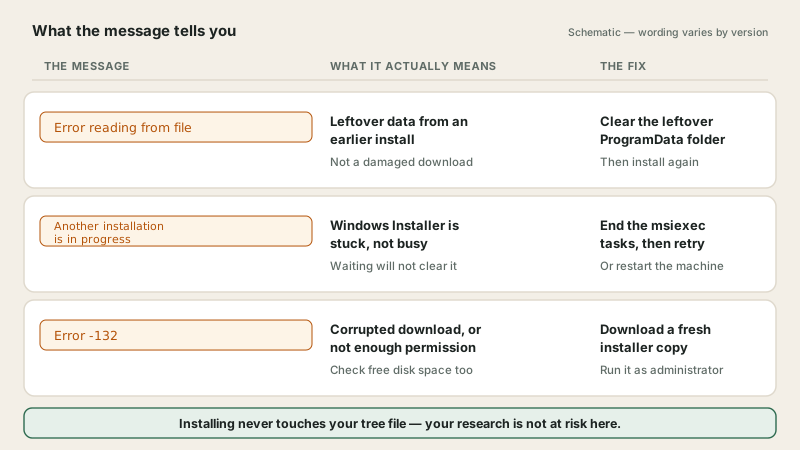
Your existing tree is not at risk here. The tree file lives separately from the program, in a Family Tree Maker folder inside Documents. Installing, reinstalling and failing to install all leave it completely untouched. This is an inconvenience, not an emergency, and worth knowing before you start.
Which error are you seeing?
Find your message here first. Working through fixes in the wrong order is how an hour disappears.
| The message | What it actually means | Go to |
|---|---|---|
| Leftover data from an earlier install, not a damaged download | Fix 2 | |
| Windows Installer is stuck, not busy | Fix 3 | |
| Corrupted download, or not enough permission | Fix 4 | |
| Installer won't download or won't start | Browser or security software blocking it | Below |
| No message. It just stops | Permissions, or background software interfering | Fix 1, then Fix 5 |
| Installs fine, then won't open | Not an install problem at all | Startup guide |
Fix 1 — Restart properly, then run as administrator
Always first Clears a surprising number of failures
-
Restart the computer properly, not sleep and not a shutdown with fast startup enabled. This releases a stuck installer process, which is the single commonest cause.
-
Right-click the installer and choose . The installer writes to protected folders, and without those rights it can fail with no useful message at all.
-
Pause your antivirus for the duration. Installers write many files quickly, which some security software treats as suspicious. Turn it back on the moment you're done.
Fix 2 — "Error reading from file"
Misleading message Clear the leftover ProgramData folder
The wording sends everyone down the wrong path. People re-download the installer three times assuming it is damaged. It usually isn't. The installer is tripping over data left behind by an earlier installation.
-
Close the installer and any running copy of Family Tree Maker.
-
Open Windows Explorer and go to the ProgramData folder on your system drive. It's hidden by default, so either turn on hidden items or paste the path straight into the address bar:
C:\ProgramData -
Find the folder containing the Family Tree Maker installation data and delete it. This holds installer bookkeeping, not your genealogy. Your tree sits in Documents and stays untouched.
-
Run the installer again, as administrator.
Fix 3 — "Another installation is in progress"
Nothing is actually installing End the stuck msiexec tasks
Windows Installer handles one job at a time. When a previous one didn't finish cleanly it stays latched, and every new installer is refused. Waiting achieves nothing, because nothing is going to complete.
-
Open Task Manager with .
-
Find every running
msiexec.exetask and end all of them. There's often more than one. -
If they won't end, look for the Windows Installer service (
msiserver) in the services list and restart it. -
Simplest alternative: restart the computer, which clears the whole thing. Then install before opening anything else.
Fix 4 — "Error -132"
Usually the download Get a fresh copy rather than reusing yours
-
Download the installer again from the publisher. Do not reuse the file you have. A partial or interrupted download is the likeliest cause, and it looks identical to a good one.
-
Check free disk space. An installer needs room for both the download and the unpacked program, which is more than people expect.
-
Clear temporary files before retrying.
-
Run the new download as administrator, because the other half of this error is insufficient permission.
If the installer won't download or won't start
- The browser blocks it. Installers are commonly flagged. Check your downloads list for a blocked file and allow it, but only for a download you fetched from the publisher yourself.
- Security software quarantines installers before you ever saw it. Check the quarantine list.
- Try a different browser if the download stalls repeatedly.
- Never take an installer from a search result or a third-party download site. That's how people acquire something other than what they wanted. Only the publisher's own download is safe.
Fix 5 — Install from a clean boot
Last resort Removes everything that interferes
A clean boot starts Windows with a minimal set of drivers and startup programs. If something in the background has been quietly breaking the install, this removes it from the equation.
-
Configure Windows for a clean boot and restart.
-
Run the installer as administrator while in that state.
-
Set Windows back to a normal startup afterwards. Clean boot is a diagnostic mode, not somewhere to leave the machine.
-
If it installs in clean boot but not normally, background software was the cause. Worth knowing for next time.
Try Windows' own repair before you reinstall
Reinstalling is the usual next thought, and it is a bigger job than it needs to be. Windows can repair an installation in place: right-click , find Family Tree Maker in the list, open Advanced options or Modify, and choose Repair. Damaged program files get replaced, your trees are left alone, and it does not ask for your registration key.
There is one more worth trying on older releases. If a version from the 2010 to 2012 era stopped installing or launching after a major Windows upgrade, right-click the installer or the program icon, choose , tick Run this program in compatibility mode and select Windows 7. Those releases predate several changes to how Windows lets programs write to their own folders, and compatibility mode puts the old behaviour back.
Reinstalling without losing your tree
Reinstalling sounds risky and is not. Family Tree Maker keeps your trees in your Documents folder, entirely separate from the program files. Removing and reinstalling the application replaces the software and leaves every tree, media folder and backup exactly where it was.
Back up first anyway. The risk is low, not zero, and a backup costs two minutes.
Find your registration key before you uninstall. Reinstalling asks for it, and hunting for it afterwards with no working software is unpleasant.
Uninstall through the operating system rather than deleting the program folder by hand. Deleting the folder leaves settings behind that cause the same fault to return.
Restart the computer before installing again. This clears the locked files that produce "another installation is in progress".
Install and register, then open your existing tree from the Documents folder.
Reinstalling costs nothing. A reinstall on the same computer uses your existing licence and key. Nobody needs to buy the software again to reinstall it.
Reinstalling an older edition works the same way. If you are reinstalling FTM 2017 or FTM 2019, check which build you end up on afterwards, because the installer and the current build are not the same thing.
If it still won't install
- Try a new administrator user account on the machine. If it installs there, your profile is the problem rather than the installer. That is the same technique used in the startup guide.
- Find your registration key first. You'll need it, and hunting for it later with no working software is a miserable hour.
- Licence, key and download problems belong to the publisher. They can reissue a key against your purchase record. That request goes to them, not to us.
Installer still failing?
We'll read the installer log with you and find where it's stopping. If we can't get it installed, you don't pay.
Making the next install easier
- Keep your registration key somewhere you'll find it, printed or in a password manager. An old inbox is not enough.
- Back up before upgrading, with media included. See backing up properly.
- Uninstall cleanly rather than deleting the program folder, which is what leaves the ProgramData debris behind.
- Note which version you had. Useful if you ever need to go back.
- Only ever download from the publisher.
Frequently asked questions
Will a failed installation damage my existing family tree?
No. Your tree file lives separately from the program, normally in a Family Tree Maker folder inside Documents, and installing or reinstalling doesn't touch it. A failed install is an inconvenience, not a threat to your research.
What does error reading from file mean during installation?
Despite how it sounds, it usually means leftover data from an earlier installation is confusing the installer, not that your download is damaged. Removing the old Family Tree Maker folder from the hidden ProgramData directory and running the installer again clears it in most cases.
Why does it say another installation is in progress when nothing else is installing?
Because Windows Installer is stuck rather than genuinely busy. Ending every running msiexec task in Task Manager, or simply restarting, releases it. Waiting doesn't help, because nothing is going to finish.
What causes error -132 in Family Tree Maker?
Usually a corrupted installer file or insufficient permissions. Download the installer again rather than reusing your copy, clear temporary files, check free disk space, and run the new download as administrator.
Do I need my registration key to reinstall?
Yes, and find it before you uninstall anything. It was issued at purchase, usually by email. If it's lost, the publisher can reissue it against your purchase record. That request goes to them, not to us or any other third party.
Should I turn off my antivirus to install?
Pausing it during the install is reasonable, because security software commonly interrupts installers that write many files quickly. Turn it back on the moment you're finished, and only ever pause it for a download you got from the publisher yourself.